How to Turn Existing REST APIs Into MCP Tools for AI Agents
Published on November 1, 2026
Use AI to summarize this article
 ChatGPT
 Claude
 Grok
Grok Perplexity
 GoogleAI
Most companies already have useful business functions behind REST APIs. Their APIs can read customer records, check orders, create tickets, update a CRM, search products, or start internal workflows.
The problem is that an AI agent does not automatically know what those APIs do, when to use them, or what information each API needs.
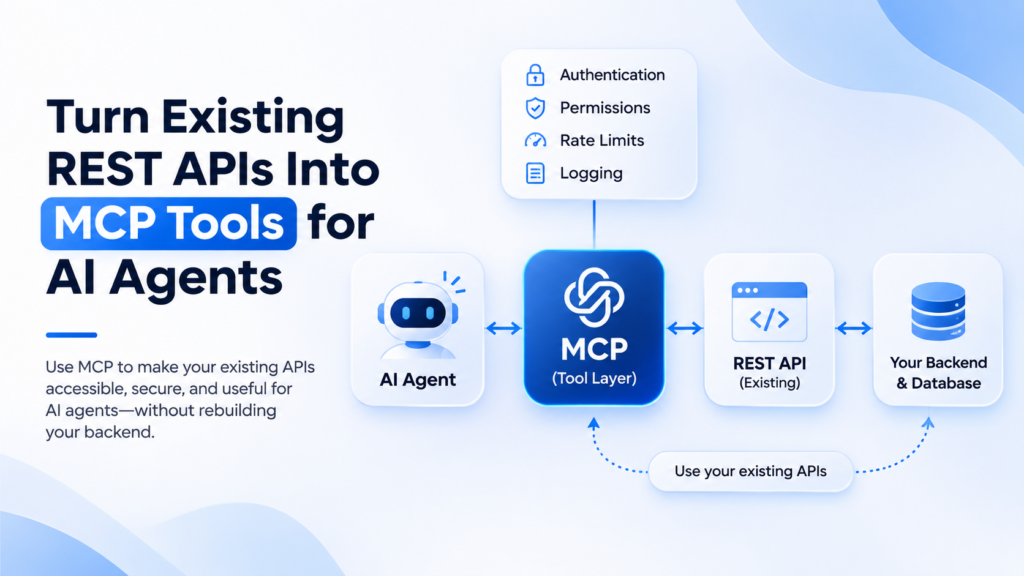
Model Context Protocol, or MCP, gives AI applications a standard way to discover and call tools. Instead of rebuilding your backend for AI agents, you can place an MCP layer in front of selected REST API operations and expose them as clear tools.
This article explains how to turn an existing REST API into MCP tools, how OpenAPI can help, what should happen with authentication and permissions, and what you should not expose to an AI agent.
Can you turn an existing REST API into MCP tools without rebuilding the backend?
Yes. In many cases, the existing REST API can stay exactly where it is.
The MCP layer sits between the AI agent and your API. It tells the agent which tools are available, what information each tool accepts, and what happens when the tool is called.
AI agent
    |
    v
MCP client
    |
    v
MCP server or API gateway
    |
    v
Existing REST API
    |
    v
Existing backend and database
The important part is that MCP does not replace your REST API. It gives AI agents a standard way to work with selected parts of it.
This is useful for companies that already have working APIs and want to add AI agents without creating another backend from the beginning.
What does MCP add on top of a REST API?
A normal REST API is designed for software developers. An endpoint may look like GET /orders/{id} or POST /tickets. Your frontend or another service already knows when and how to call it.
An AI model needs more guidance. It needs to understand what the operation does, when it should use it, and what input it needs.
MCP tools provide that layer.
An MCP tool normally has a clear name, a description, an input structure, and the code that runs when the tool is called. The current MCP tool specification also allows clients to discover available tools and invoke them through standard methods.
For example, an existing REST API may have this operation:
GET /orders/{orderId}The MCP tool could expose it as:
Tool name:
get_order_status

Description:
Get the current delivery status and expected delivery date for an order.

Input:
orderId
The description matters because the AI model uses this information when deciding whether the tool fits the user’s request.
Use OpenAPI as the starting point
If your REST API already has a good OpenAPI specification, much of the information needed for MCP may already exist.
OpenAPI can describe:
- API operations
- Path parameters
- Query parameters
- Request bodies
- Response structures
- Authentication requirements
- Operation names
- Operation descriptions
This makes OpenAPI a useful bridge between an existing REST API and MCP tools.
Google Cloud now supports this directly in API Gateway for OpenAPI 3.x APIs. Selected REST operations can be exposed as MCP tools while the existing backend remains unchanged. AWS also supports exposing API Gateway REST APIs as MCP compatible tools through Amazon Bedrock AgentCore Gateway.
You do not have to use a managed gateway. A custom MCP server can also read your API definition and call the existing REST endpoints. The right option depends on your infrastructure and how much control you need.
Do not expose every API endpoint as an MCP tool
This is one of the most important decisions.
If your backend has 150 API operations, that does not mean your AI agent should receive 150 tools.
Start with the work the agent actually needs to perform.
For example, a customer support agent may need:
- Get an order
- Check delivery status
- Read customer information
- Create a support ticket
It probably does not need tools for deleting customers, changing account roles, exporting the full database, or editing internal system settings.
Smaller tool sets are easier to understand, easier to secure, and easier to test.
This follows the same principle we discuss in our AI security guide. An AI agent should receive only the data and tools required for its job.
Write tool descriptions for the AI model, not only for developers
A weak tool description might say:
Returns order data.That tells the model very little.
A better description is:
Get the current status, shipping carrier, and expected delivery date for a customer order. Use this when a user asks where an order is or when it should arrive.Now the model has a much clearer reason to use the tool.
Good tool descriptions should explain what the tool does, when it should be used, and any important limits. Keep them simple and specific.
Do not put important security rules only inside the description. Tool descriptions guide model behavior. Your backend must still enforce the real rules.
Authentication and authorization are different
Authentication answers one question:
Who is making this request?
Authorization answers another:
What is this user or agent allowed to do?
Both matter when REST APIs become MCP tools.
For remote MCP servers, the MCP authorization specification supports an OAuth based flow. Existing API gateway systems may also support API keys, JWT tokens, OAuth, or other approved methods depending on the setup.
But a valid token should not automatically mean access to every tool or every record.
Imagine two companies use the same SaaS platform. A user from company A asks an agent to read an invoice. The MCP tool must still make sure that invoice belongs to company A before returning anything.
Your normal tenant and user permission checks should stay in place.
AI request
    |
    v
Authenticate caller
    |
    v
Check tool permission
    |
    v
Check customer and record access
    |
    v
Call REST API
    |
    v
Return allowed result
The MCP layer should never become a shortcut around the application’s existing permission system.
Keep read tools and action tools separate
Not every MCP tool has the same level of risk.
A tool that reads an order is different from a tool that cancels the order.
A useful way to design tools is to separate them by what they can do.
| Tool type | Example | Control |
|---|---|---|
| Read | Get order status | Check user access |
| Create | Create support ticket | Validate input and log action |
| Update | Change customer address | Check permission and current record |
| High risk action | Cancel order or issue refund | Consider user confirmation or approval |
The current MCP tool specification recommends keeping people informed when tools are being used and allowing human control for important operations.
For higher risk actions, do not depend only on the model deciding that the action is safe. Use normal application rules and approval where needed.
We cover this in more detail in how to keep AI useful without giving it too much control.
Do not expose a generic API request tool
One tempting design is to give the agent one tool like this:
call_api(
  method,
  url,
  body
)
This is flexible, but it gives the model too much freedom.
A safer design exposes narrow tools:
get_order_status(orderId)

create_support_ticket(customerId, subject, message)

update_shipping_address(orderId, address)
Now each tool has a clear job. The backend can validate its inputs, check permissions, limit what can change, and log exactly what happened.
This also makes the tools easier for the model to choose correctly.
Return clean data from MCP tools
Your REST API may return a large response because several parts of the existing application use it.
The AI agent may need only a small part of that response.
For example, the REST API may return:
{
  "order": {...},
  "customer": {...},
  "warehouse": {...},
  "internal_notes": {...},
  "shipping": {...},
  "billing": {...}
}
If the agent only needs delivery status, do not automatically send everything back to the model.
A cleaner tool result could be:
{
  "orderId": "A1042",
  "status": "in_transit",
  "carrier": "Example Carrier",
  "expectedDelivery": "2026-11-04"
}
This reduces unnecessary context and lowers the chance of exposing information the model does not need.
Keep the existing backend as the source of truth
The MCP server should not create a second copy of your business rules if those rules already exist in your backend.
For example, if your existing API already checks whether an order can be cancelled, keep that check there.
The flow should be:
AI agent requests cancellation

MCP tool validates basic input

Existing API checks:
User permission
Order state
Cancellation rules
Business limits

API performs or rejects the action

MCP returns the result
This avoids having one set of rules for your normal application and another set for AI agents.
It also makes the system easier to maintain because your main backend remains responsible for business logic.
This is similar to the architecture we recommend when adding AI features to existing software. The main application should remain in control while AI works through defined interfaces.
Rate limits and retries still matter
An AI agent can call the same tool several times. It may retry after an unclear response or make several calls while completing one task.
Your normal API controls should still apply.
Use rate limits where needed. Keep timeouts. Validate input. Track failures. For actions that create or change data, make retries safe so the same call does not create duplicate work.
For example, if an agent creates a support ticket and the response is lost, a retry should not create a second ticket without checking what happened to the first request.
Our article on reliable AI agent architecture explains retries, state, logs, and duplicate protection in more detail.
Log every important MCP tool call
Once an AI agent can act on real systems, you need to know what it did.
For important tool calls, record information such as:
- Tool name
- User or agent identity
- Request ID
- Important input fields
- Result status
- Execution time
- Error information
- Approval information when required
Do not blindly store passwords, tokens, or private data in logs.
Logs make it possible to answer questions such as: Which tool did the agent call? What record did it try to update? Did the REST API reject the request? Did the same tool run twice?
Test the MCP layer before giving it to real users
Do not test only whether tools/list works and whether one successful tool call returns data.
Test the cases that can break the real system.
- Invalid IDs
- Missing required fields
- Users without permission
- Records from another customer
- Slow REST APIs
- API errors
- Repeated tool calls
- Duplicate write requests
- Expired authentication
- High risk actions without approval
Also test whether the model chooses the correct tool when several tools have similar names or descriptions.
Our guide on testing AI agents before production covers permission checks, tool failures, retries, and real workflow testing.
Do you need to build your own MCP server?
Not always.
You have two common options.
Build a custom MCP server
This gives you full control over tool design, authentication, response handling, business logic, and connections to different systems. It can make sense when your agent uses several services or needs custom behavior around each tool.
Use an API gateway that supports MCP
If your APIs already sit behind a supported gateway, you may be able to expose selected OpenAPI operations as MCP tools without creating a separate MCP service.
Google Cloud API Gateway currently supports this for OpenAPI 3.x APIs. AWS also provides an MCP path for existing API Gateway REST APIs through AgentCore Gateway.
The important decision is not whether custom code or a gateway sounds more modern. Choose the option that keeps your existing authentication, permissions, logging, and business rules clear.
A simple production architecture
For many existing SaaS or enterprise systems, a clean setup looks like this:
ChatGPT, Claude, Gemini, or another AI client
                    |
                    v
                MCP client
                    |
                    v
          MCP server or gateway
                    |
          Authentication check
                    |
           Permission checks
                    |
                    v
             Existing REST API
                    |
             Business rules
                    |
                    v
          Database and services
                    |
                    v
           Structured response
                    |
                    v
               AI agent
The AI layer gets a simple set of useful tools. The existing backend continues to control business rules and data access.
That separation is important because MCP should make your APIs easier for agents to use. It should not weaken the system that already protects them.
What to check before exposing a REST API through MCP
- Your API has clear operations and input rules.
- You know exactly which operations the agent needs.
- Tool names and descriptions are clear.
- Authentication is required where needed.
- User and customer permissions are checked by the backend.
- High risk actions have stronger controls.
- Tool responses contain only useful information.
- Rate limits and timeouts are still enforced.
- Write operations are safe to retry.
- Tool calls are logged.
- Permission failures and API errors are tested.
Final thoughts
You do not need to rebuild a working backend just because AI agents need access to it.
If your company already has REST APIs, MCP can provide a standard layer that helps AI agents discover and call selected operations. OpenAPI can make that process easier because much of the API structure is already described.
The harder part is not converting an endpoint into a tool. The harder part is deciding which tools should exist, who can call them, which data they can access, what actions need approval, and how every call should be logged and tested.
Keep the existing backend in control. Expose narrow tools. Keep authentication and permissions around every important action. Then let MCP handle the connection between the AI agent and the APIs you already trust.
If your company has existing software or APIs and wants to make them safely available to AI agents, Byteonic Labs helps teams design and build the AI layer around existing systems, including MCP tools, API integrations, agent workflows, permissions, security, and production architecture.
Learn more about how we work as an AI implementation partner.