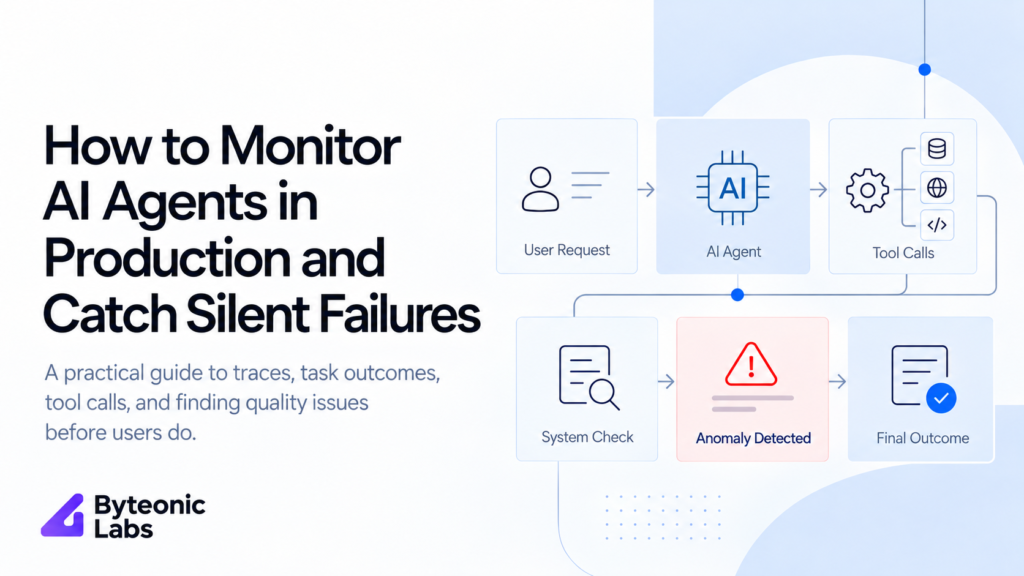
How to Monitor AI Agents in Production and Catch Silent Failures
Published on October 13, 2026
Use AI to summarize this article
 ChatGPT
 Claude
 Grok
Grok Perplexity
 GoogleAI
An AI agent can fail even when your monitoring dashboard says everything is healthy.
The API returns a successful response. The model answers. The tool call finishes. Nothing crashes.
But the agent still does the wrong thing.
Imagine a customer asks an AI support agent to issue a refund. The agent replies that the refund has been completed. The payment API returned successfully, so your normal monitoring sees no error.
But when you check the payment system, no refund exists.
From an infrastructure point of view, the request worked.
From the customer’s point of view, it failed.
This is a silent AI agent failure.
These failures are difficult because normal software monitoring is usually built to find crashes, slow requests, failed API calls, database errors, and server problems. AI agents can have all of those problems, but they can also fail while every technical system remains healthy.
That changes how production AI agents need to be monitored.
In this article, we will look at how to trace an AI agent from the first user request to the final business result, how to find silent failures, what information should be recorded, how to evaluate real production sessions, and how to turn failures into tests that stop the same problem from coming back.
What is a silent AI agent failure?
A silent failure happens when an AI agent completes a run without a clear technical error, but the final result is wrong, incomplete, or different from what the user asked for.
This is different from a normal application error.
If an API returns an error, a worker crashes, or a database connection fails, your normal monitoring tools can usually detect it.
A silent failure may look completely healthy.
For example:
- The agent calls the wrong tool, but that tool returns successfully.
- The agent calls the correct tool with the wrong information.
- The tool returns the right information, but the agent ignores part of it.
- The agent forgets something the user said earlier in the conversation.
- The agent sends work to the wrong specialist agent.
- The agent says an action is complete even though the action never happened.
- The agent completes only part of the task and tells the user everything is finished.
- The agent uses old or incorrect business data.
Google recently described this exact production problem in its work on agent quality. A request can return successfully, stay within normal response time, and have no tool errors while the agent still produces the wrong business result.
You can read Google’s detailed production example in its article on finding silent failures in production AI agents.
Why normal monitoring is not enough for AI agents
Traditional software monitoring is still important.
You should continue tracking things such as:
- API errors
- Response time
- Database errors
- Queue failures
- Worker failures
- Tool timeouts
- Memory and CPU usage
- Retry counts
But these numbers cannot tell you whether the agent actually completed the user’s task correctly.
An AI agent usually sits on top of normal software.
A simple agent workflow might look like this:
User request
    |
    v
Agent
    |
    v
Model
    |
    v
Tool selection
    |
    v
Tool call
    |
    v
Business system
    |
    v
Tool result
    |
    v
Agent response
    |
    v
Final business result
Every technical step in this flow can work while the final business result is still wrong.
This is why agent monitoring needs to answer two different questions.
Did the system run correctly?
And:
Did the agent actually complete the task correctly?
You need both.
Our article on reliable AI agent architecture explains the first part in more detail, including queues, retries, state, workers, and normal system failures.
This article focuses on the second problem.
Start by defining what success actually means
You cannot detect a silent failure if your system does not know what a successful task looks like.
This sounds simple, but it is one of the most important parts of production agent monitoring.
Do not define success as:
The agent returned a response.
That only tells you the agent finished speaking.
Define success based on the real task.
For a refund agent, success may mean that a refund record exists in the payment system.
For a CRM agent, success may mean that the correct customer record was updated with the expected values.
For a research agent, success may mean that the final answer contains the required information and that the important claims are supported by the sources it found.
For a booking agent, success may mean that a real reservation exists.
The final result matters more than whether the agent said the task was completed.
The agent response and the real outcome are not the same thing
This difference is important enough to design around directly.
Consider this conversation:
User:
Please refund order 4821.

Agent:
Your refund has been successfully issued.
If you monitor only the final message, the task appears successful.
Now look at the actual business system:
Order: 4821
Refund status: Not created
This is the real result.
The agent’s message is not proof that the work happened.
Anthropic makes a similar point in its guidance on evaluating AI agents. The final state of the environment can be more useful than checking only what the agent said.
Where possible, verify the result directly from the business system.
Trace the complete agent run
When a silent failure happens, you need to see how the agent reached the result.
This is where traces become useful.
A trace is a structured record of what happened during one agent run.
It can include:
- The user request
- The agent version
- The model used
- The instructions used
- Each model call
- Each tool the agent selected
- The information sent to the tool
- The tool result
- Agent handoffs
- Important state changes
- The final response
- The final business result
- Time taken
- Token usage
- Retry information
OpenAI’s current agent tooling records model calls, tool calls, handoffs, guardrails, and other steps in traces. Its agent evaluation documentation also recommends using traces to find problems across complete agent workflows.
You do not need to use one specific AI platform to follow this approach.
OpenTelemetry also provides a common way to represent operations across services, which can be useful when your agent talks to APIs, databases, workers, and other systems.
What should you store in an AI agent trace?
A useful trace should make it possible to answer one simple question later:
What happened during this task?
A simplified record could look like this:
{
  "trace_id": "tr_84021",
  "workflow": "customer_refund",
  "agent_version": "refund_agent_v12",
  "model": "model_name",
  "user_request": "Refund order 4821",
  "tool_calls": [
    {
      "tool": "create_refund",
      "order_id": "4821",
      "status": "completed"
    }
  ],
  "agent_result": "Refund completed",
  "business_result": "refund_not_created",
  "task_success": false
}
The most important field in this example is not the model name.
It is:
"task_success": falseThe API completed.
The tool reported completion.
The agent told the customer that the refund worked.
But the real business result says it did not.
That is the type of failure your monitoring system needs to find.
Do not blindly store everything
Tracing is useful, but traces can contain sensitive information.
A customer support agent may process names, addresses, account data, payment information, internal notes, or private documents.
Do not store every raw prompt and every tool result without thinking about what is inside them.
Your tracing layer should decide what can be stored, what should be removed, what should be masked, how long traces should remain available, and who can access them.
If a tool receives a credit card number, password, private token, or secret key, that value should not appear in normal monitoring logs.
This connects directly with the security controls we covered in AI security for business.
Monitor the agent at four different levels
A useful production monitoring system should look at more than one type of signal.
1. System health
This is the normal software layer.
Track:
- Request errors
- Response time
- Queue time
- Worker failures
- Database failures
- Tool API failures
- Retries
This tells you whether the infrastructure is healthy.
2. Agent workflow
Now look at what the agent actually did.
Track:
- Which tool was selected
- Which arguments were sent
- How many tools were called
- Whether the expected tool was skipped
- Whether the same tool was called several times
- Whether the correct agent received a handoff
- Whether important workflow state was lost
This helps you find cases where the technical system worked but the agent chose the wrong path.
3. Task outcome
This is usually the most valuable layer.
Check whether the intended action actually happened.
Examples include:
- Was the refund created?
- Was the correct record updated?
- Was the email actually sent?
- Was the booking actually created?
- Was the requested file generated?
- Did the user receive the correct data?
If possible, check this using your own application or database instead of asking the AI whether it succeeded.
4. Response quality
Some tasks cannot be checked using a simple database value.
A research answer can be complete or incomplete.
A support answer can be technically correct but ignore the user’s main question.
An agent can follow the workflow correctly but provide a confusing answer.
For these cases, you need evaluation.
Use simple checks whenever you can
Not every agent result needs another AI model to check it.
If normal code can verify something, use normal code.
For example, if a refund should exist after the agent finishes, query the payment system.
async function checkRefund(orderId) {
  const refund = await paymentSystem.getRefund(orderId);

  if (!refund) {
    return {
      passed: false,
      reason: "Refund was not created"
    };
  }

  return {
    passed: true
  };
}
This check is simple and clear.
There is no reason to ask another language model whether a refund exists when the payment system can answer the question directly.
Other checks can include:
- Expected database row exists
- Required field was updated
- Amount is within the allowed range
- Correct tool was called
- Required approval happened
- No duplicate record was created
- Final status matches the requested action
These checks are easier to trust because the result does not depend on another model deciding whether something looks correct.
Use a model grader when normal code cannot judge the result
Some agent tasks are not simple yes or no checks.
Imagine an agent that reviews a support case and writes a response.
You may want to know:
- Did it answer the customer’s main question?
- Did it follow company policy?
- Did it use the information returned by the tools?
- Did it make up information?
- Did it ignore an important user request?
- Did it claim something happened when there is no proof?
These checks can be difficult to write as normal code.
A second model can review the trace using clear rules and return a score or a simple pass or fail result.
For example:
Check this support session.

Pass only if:

1. The agent answered the user's request.
2. Important facts came from the provided tool results.
3. The agent did not claim an action happened unless the trace proves it.
4. The final answer follows the refund policy.

Return:

PASS

or

FAIL with a short reason.
This type of checking can help review large numbers of sessions.
But do not assume the grader is always correct.
A model checking another model can also make mistakes.
Anthropic recommends combining different forms of evaluation and using people to check whether model based graders agree with the quality standard you actually want.
Human review still matters
You should regularly read real production traces.
Do not build a dashboard and assume the dashboard understands your users better than your team does.
A weekly review of a small number of real sessions can reveal problems that no automatic score currently measures.
Look at:
- Failed sessions
- Sessions with user complaints
- Sessions with repeated tool calls
- Very long sessions
- Expensive sessions
- Sessions where a user corrected the agent
- Sessions where the user stopped halfway through
- A random sample of normal sessions
The random sample is important.
If you review only sessions that already look unusual, you can miss silent failures where every technical signal looks normal.
Do not rely only on user feedback
A thumbs down button is useful, but it cannot be your full monitoring system.
Many users do not report a bad result.
They simply leave.
A customer may see that the agent misunderstood the request and decide to contact support another way.
A user may quietly correct the record themselves.
A manager may stop using the AI feature.
None of these users need to click a feedback button for the agent to have failed.
This is one reason production evaluation needs to inspect real sessions even when users have not reported a problem.
Look for repeated failure patterns instead of isolated bad answers
One bad session matters.
But ten sessions failing for the same reason tell you much more.
Suppose you review 500 agent sessions and find these failures:
- 18 sessions lost the customer’s selected product after a handoff.
- 11 sessions called the search tool without the required account ID.
- 7 sessions told users an action was finished before the final database update completed.
- 4 sessions produced unrelated answers for different reasons.
The first three are patterns.
Those patterns should become engineering work.
Google’s recent production agent work follows a similar approach. Its system reviews production sessions, groups similar failures, checks whether the pattern is real, and then tracks whether the same issue continues to appear.
This is much more useful than keeping a list of hundreds of unrelated bad conversations.
Give every failure enough information to investigate it
When your monitoring system finds a problem, the engineering team should not have to start from zero.
A useful failure record could include:
- Failure type
- Trace ID
- Workflow name
- Agent version
- Model version
- User request
- Expected result
- Actual result
- Relevant tool calls
- Important state
- Deployment version
- Time of failure
For example:
Failure:
Refund marked complete without refund record

Expected:
A refund record should exist before the agent tells the user the refund is complete.

Actual:
Agent returned success.
No refund record exists.

Trace:
tr_84021

Agent version:
refund_agent_v12

Deployment:
2026_10_13_02
This gives the engineer somewhere useful to begin.
Save the version of the agent that produced the trace
Production AI agents change frequently.
You may change:
- The model
- The system instructions
- A tool description
- A tool schema
- The retrieval logic
- The context given to the model
- The handoff rules
- The application code
If you find a bad session next week, you need to know which version produced it.
Do not store only the trace.
Store the agent version or deployment version with it.
Otherwise, an engineer may inspect today’s prompt while trying to understand a failure created by last week’s prompt.
Context failures can look like model failures
Sometimes the model is blamed for a problem that started before the model received the request.
Imagine a sales agent receives the wrong customer record.
The model may correctly use the information it was given, but still give the wrong answer because the application supplied the wrong context.
Or an agent may lose an important instruction during a handoff.
Or a retrieval system may return an old policy.
Or an application may load an older workflow state.
That is why the trace needs to show what information the model actually received.
We cover this problem more deeply in our article on context engineering for AI agents.
Tool calls need more monitoring than success and failure
A tool returning a successful response does not mean the agent used the tool correctly.
Imagine a CRM tool:
update_customer(
  customer_id,
  field,
  value
)
The tool can successfully update:
customer_id: 801
field: phone
value: +1 555 0100
But what if the user was actually talking about customer 810?
The tool worked.
The agent did not.
For important tool calls, monitor:
- Was this the correct tool?
- Were the inputs valid?
- Did the inputs match the current user and task?
- Did the tool result match the expected type?
- Did the agent use the result correctly?
- Did the action create the expected business change?
For higher risk actions, the application can also place checks before and after the tool call.
This is part of the same principle discussed in keeping AI useful without giving it too much control.
Monitor handoffs between agents
Multi agent systems create another place where silent failures can happen.
An agent may correctly decide that another agent should handle the task, but important information may disappear during the handoff.
For example:
A customer tells the first agent:
I need a hotel in London.
It must allow pets.
The first agent sends the task to a hotel search agent but passes only:
Find a hotel in London.The second agent works correctly based on the information it received.
But the complete workflow fails because the pet requirement disappeared.
A good trace should make the handoff visible.
You should be able to compare what the first agent knew with what the next agent received.
How to monitor agent quality in production
Running your full test set before deployment is important, but production traffic will always contain cases that your development team did not expect.
Production evaluation means checking real agent sessions after they happen.
A practical process can look like this:
- Collect traces from production.
- Run simple code checks where the result can be checked directly.
- Use model based checks for quality questions that normal code cannot answer.
- Review a sample of sessions manually.
- Group similar failures.
- Find the cause of the most common failures.
- Turn important failures into test cases.
- Fix the agent.
- Run the test set again.
- Deploy the new version.
- Check whether the same production failure returns.
This creates a continuous improvement loop.
Production traffic
       |
       v
     Traces
       |
       v
Evaluation
       |
       v
Find failures
       |
       v
Group patterns
       |
       v
Find the cause
       |
       v
Create test case
       |
       v
Fix agent
       |
       v
Run tests
       |
       v
Deploy
       |
       v
Monitor again
Production failures should become test cases
This is one of the most useful habits you can build.
If a real user finds a new failure, do not only fix that one conversation.
Save the case.
Add it to your evaluation set.
For example, imagine a user changes their requested delivery address halfway through a conversation and the agent still sends the order to the old address.
You fix the workflow.
Now create a test where:
- The user selects address A.
- The agent starts the order.
- The user changes to address B.
- The agent continues the task.
- The final order must contain address B.
From that point forward, every important agent change should run this test.
If the bug comes back, you can find it before users do.
This connects directly with our guide on testing AI agents before production.
Run tests when anything important changes
An agent can change even when you did not edit its main prompt.
You should consider running your evaluation set when you change:
- The model
- The prompt
- A tool
- A tool description
- A tool schema
- Retrieval settings
- Business rules
- Agent routing
- Memory logic
- Context building
A small tool description change can affect which tool the model selects.
A model upgrade can improve some workflows and make others worse.
A new retrieval method can change which documents appear in context.
The only safe way to know whether the full workflow improved is to test it.
What AI agent metrics should you track?
You do not need hundreds of metrics.
Start with numbers that help you answer real questions.
| Metric | What it tells you |
|---|---|
| Task success rate | How often the agent actually completes the requested task. |
| Silent failure rate | How often a run looks technically successful but the task is wrong. |
| Tool failure rate | How often tools return errors or cannot complete their work. |
| Wrong tool rate | How often the agent chooses a tool that does not match the task. |
| Human correction rate | How often people need to fix the agent’s work. |
| Escalation rate | How often the agent needs help from a person. |
| User correction rate | How often users need to repeat or correct information. |
| Average task time | How long the full task takes. |
| Average tool calls | Whether workflows are becoming unnecessarily long. |
| Cost per completed task | How much successful work actually costs. |
Do not look at one metric alone.
An agent can become faster while task quality becomes worse.
It can become cheaper while requiring more human corrections.
It can reduce tool failures while selecting the wrong tool more often.
Production monitoring needs enough context to understand the complete task.
How many production sessions should you evaluate?
Evaluating every session can become expensive when an agent handles a large amount of traffic.
You can use a mixed approach.
Run cheap code based checks on every session where possible.
For example, checking whether a record exists in your own database may cost almost nothing compared with asking another model to review a long conversation.
Then use deeper evaluation on selected sessions.
You may want to review:
- A random sample of normal traffic
- Sessions with negative user feedback
- Sessions with unusual numbers of tool calls
- Very long sessions
- Sessions with retries
- High value workflows
- High risk actions
- Sessions after a new deployment
For very important workflows, deeper evaluation may be worth running much more often.
There is no single percentage that is correct for every company.
The right amount depends on traffic, cost, risk, and how important the workflow is.
Do not send alerts for every bad answer
If every failed evaluation sends an alert to an engineer, people will eventually stop reading the alerts.
Use alerts for patterns that need action.
For example:
- Task success falls below the normal range.
- A new failure pattern appears repeatedly.
- A high risk action fails.
- The same silent failure affects many users.
- A deployment causes a clear quality drop.
- The agent starts calling an important tool incorrectly.
Lower priority failures can be collected for regular review instead of waking someone up immediately.
Compare quality before and after every important deployment
Suppose agent version 14 has a task success rate of 92 percent on your production evaluation sample.
You release version 15.
Infrastructure health remains perfect.
But task success falls to 84 percent.
That is a production problem even if your error dashboard is completely green.
Your deployment process should make it easy to compare agent versions.
Keep the same core evaluation rules so you can see whether a change improved or damaged important workflows.
Find the cause before changing the prompt
When an agent fails, changing the prompt is often the first reaction.
But the prompt may not be the problem.
A silent failure can come from:
- The model
- The instructions
- The tool schema
- The tool result
- The application state
- The retrieval system
- The agent handoff
- The permission layer
- The external API
- Missing business rules
This is why traces matter.
If you can see the complete path, you can fix the part that actually failed.
Otherwise, teams can spend days changing prompts for a problem caused by application code.
A practical architecture for production AI agent monitoring
A simple production design can look like this:
User request
      |
      v
Agent workflow
      |
      +--------------------+
      |                    |
      v                    v
Model calls            Tool calls
      |                    |
      +---------+----------+
                |
                v
          Business result
                |
                v
              Trace
                |
        +-------+-------+
        |               |
        v               v
Simple checks      Model evaluation
        |               |
        +-------+-------+
                |
                v
         Quality results
                |
                v
        Failure grouping
                |
                v
        Engineering review
                |
                v
          New test cases
The agent should not need to wait for most of this work.
Production evaluation can usually happen after the user receives the result.
The trace can be sent to a background process, checked, scored, and stored for later analysis.
This keeps quality monitoring outside the main user request.
Keep monitoring separate from the agent itself
Do not ask the same agent to decide whether its own work was correct and treat that answer as proof.
The agent may say:
Yes, I completed the task correctly.
That does not mean it did.
Your monitoring layer should use the trace, application state, tool results, business data, and separate checks to make that decision.
The agent being monitored should not control the evidence used to judge itself.
Know when a person needs to step in
Monitoring should not only create reports.
For important workflows, it should also help decide when the agent should stop or ask for help.
For example, a workflow might require human review when:
- The agent cannot confirm an important result.
- Two business systems return conflicting information.
- A required tool is unavailable.
- A high value action is about to happen.
- The agent has tried the same action several times.
- The requested action falls outside the agent’s allowed work.
These controls should be defined before something goes wrong.
For larger companies running many agents, this also becomes part of AI agent governance.
Common mistakes when monitoring AI agents
Only monitoring API errors
A successful API response does not tell you whether the task was completed correctly.
Only reading the final answer
The final response hides what happened inside the workflow. Record the tool calls, state, and final business result.
Trusting the agent when it says a task is complete
Check the real system whenever possible.
Using another model for every check
Use normal code for facts that normal code can verify. Use model based evaluation where judgement is actually needed.
Reviewing only sessions with user complaints
Many users never report bad results. Include random production sessions in your review.
Fixing a failure without adding a test
If a real production failure matters enough to fix, it should usually become a test so the same problem does not return.
Changing prompts without finding the real cause
The problem may be a tool, state, retrieval, handoff, or application bug.
Logging sensitive data without controls
Traces can contain private business and customer information. Decide what can be stored and who can access it.
Tracking too many numbers without knowing what success means
Start with the business result. Then choose metrics that tell you whether the agent is reaching that result reliably.
What a good production monitoring process looks like
A reliable monitoring process does not begin with a dashboard.
It begins with a clear definition of success.
For every important agent workflow, your team should be able to answer:
- What task is this agent responsible for?
- What proves that the task succeeded?
- Which tool calls matter?
- Which business state should change?
- What should happen when the result cannot be confirmed?
- Which parts can be checked with normal code?
- Which parts need deeper evaluation?
- Which failures need human review?
Once these answers are clear, monitoring becomes much easier to design.
Final thoughts
AI agent monitoring cannot stop at server health, API errors, and response time.
Those signals tell you whether your software is running.
They do not tell you whether your agent is doing the right work.
A production agent needs traces that show what happened across the complete task.
It needs checks that compare what the agent said with what actually happened.
It needs evaluation for tasks that cannot be checked with simple code.
It needs real production sessions reviewed so new problems can be found.
And when a new failure appears, that failure should become a test that protects future versions.
The most dangerous AI agent failure is not always the one that crashes.
Sometimes it is the one that looks successful.
If your company is building AI agents inside real business systems, Byteonic Labs helps teams design the full production layer around them, including workflow architecture, tracing, evaluation, tool integration, data access, security, and monitoring.
Learn more about how we work as an AI implementation partner.
AI agent monitoring means tracking what an agent does after it receives a user request. This includes model calls, tool calls, workflow steps, errors, final answers, and whether the real task was completed correctly.
A silent failure happens when the system looks healthy but the agent still gives the wrong result. For example, the API may return success, but the requested action may never happen in the real business system.
You should track the full agent trace, tool calls, workflow state, final response, and final business result. Normal system logs are useful, but they are not enough to tell whether the agent actually completed the task correctly.
A useful trace should include the user request, model calls, tool calls, tool inputs, tool results, agent version, workflow state, final response, and the final business result.
Compare what the agent says with what actually happened in the system. For example, if the agent says a refund was completed, check whether the refund record really exists.
Sometimes. A second model can help review complex answers that normal code cannot easily check. But where possible, use direct system checks because they are more reliable for things such as payments, database updates, bookings, and completed actions.
Useful metrics include task success rate, silent failure rate, tool failure rate, human correction rate, user correction rate, average task time, number of tool calls, and cost per completed task.
Production agents should be checked continuously through traces and simple system checks. Teams should also review real sessions regularly and turn important production failures into test cases so the same problem does not return.