How to Reduce LLM Latency and Cost in Production Without Changing the Model
Published on October 24, 2026
Use AI to summarize this article
 ChatGPT
 Claude
 Grok
Grok Perplexity
 GoogleAI
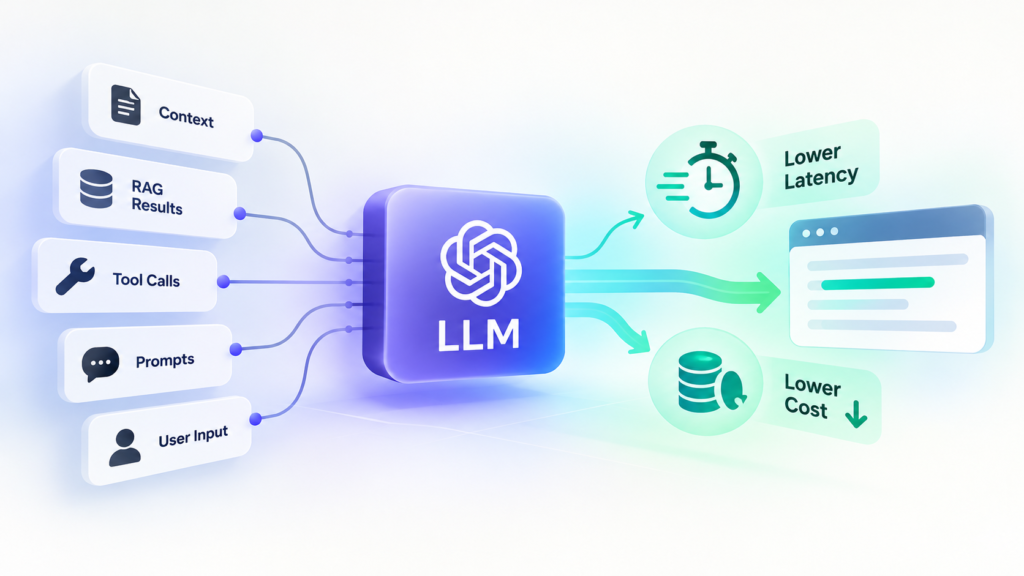
An LLM application can feel fast during development and become slow or expensive once real users start using it. In many cases, the model itself has not changed. What changed is the amount of context, the number of tool calls, the size of the output, the number of model requests, and the amount of repeated work happening around the model.
This is why changing the model should not always be the first step. A production LLM system can often become faster and cheaper by improving the way the application builds prompts, retrieves data, uses tools, caches repeated information, and handles responses.
In this article, we will look at practical ways to reduce LLM latency and cost without changing the model.
Measure where the time and cost are coming from
Before changing anything, measure the complete request. An LLM workflow may load user data, search documents, call the model, use an external tool, call the model again, and then save the final result. If the complete task takes eight seconds, the model may be responsible for only part of that time.
Track a few useful numbers for every important workflow:
- Total request time
- Time to first token
- Input tokens
- Output tokens
- Number of model calls
- Number of tool calls
- Retrieval time
- Tool response time
- Cached input tokens
- Cost per successful task
This helps you find the real problem instead of making random changes to the prompt. OpenAI also recommends looking at output size, number of requests, parallel work, and unnecessary model calls when improving latency. You can read its official latency optimization guidance.
If you are already running agents in production, our guide on monitoring AI agents in production explains how to trace the full workflow instead of looking only at the final model response.
Reduce output that the user does not need
Long answers take longer to generate and usually cost more because the model produces more output tokens. A simple support question may need two sentences, while a report may need several paragraphs. The application should decide the right response length for the task instead of allowing every request to produce a long answer.
For example, instead of asking the model to explain everything in detail, you can ask it to give the answer first and keep the explanation short unless the user asks for more detail.
Answer the question directly.

Keep the response under three short paragraphs.

Include more detail only if it is required to complete the task.
This is one of the simplest ways to improve response time without changing the model.
Send only the context the model actually needs
Large context windows make it possible to send a lot of information, but that does not mean you should send everything available. A production request may contain long instructions, conversation history, user data, retrieved documents, tool definitions, and earlier tool results. Some of this may not matter for the current request.
If a customer asks about one invoice, the model probably does not need the customer’s complete invoice history. If the question is about shipping, it may not need the full refund policy. If an agent only needs two tools, it may not need definitions for another twenty tools.
The goal is not to create the shortest prompt possible. The goal is to give the model enough information to complete the task correctly without filling the request with information it does not need.
This is part of context engineering. Good context design decides what information should be available for the current task instead of treating the context window as a database.
Keep RAG results focused
RAG systems can become expensive when they retrieve too many document chunks and send all of them to the model. If a search returns twenty pieces of text but only three are useful, the model still has to process the extra information.
A better flow is to search the permitted data, remove weak or repeated results, and send only the most useful information to the model. You can also use filters such as customer ID, document type, product, date, or category before retrieval.
User question
      |
      v
Search permitted documents
      |
      v
Filter weak or duplicate results
      |
      v
Keep useful context
      |
      v
Send to the model
Do not reduce retrieval results only to save tokens. Test whether the remaining context is still enough to answer the question correctly.
If the documents in your RAG system change often, also make sure the retrieved information is current. We covered this in how to keep a RAG system up to date when documents change.
Use prompt caching for repeated information
Many LLM requests contain large sections that stay the same, such as system instructions, company rules, tool definitions, examples, and shared reference documents. Processing the same information repeatedly can add cost and waiting time.
OpenAI supports prompt caching, while Google Gemini provides context caching. Anthropic also provides prompt caching for supported models.
The exact implementation is different between providers, but the idea is simple. If a large part of the request is repeated, the provider may be able to reuse earlier processing instead of starting from the beginning every time.
Keep stable content first
Prompt caching is more useful when the repeated part of the prompt remains stable. Keep system instructions, company rules, tool definitions, and other repeated content before information that changes on every request.
System instructions

Company rules

Tool definitions

Shared reference information

Current user information

Current question
Avoid placing changing values such as the current time, request ID, user name, or customer details before large stable sections unless they are really needed there.
Reduce unnecessary model calls
One of the easiest ways to make an LLM workflow slow is to make several model calls one after another. A system may use one call to rewrite the question, another to classify it, another to decide whether search is required, and another to generate the answer.
Some of these steps can often be combined.
{
  "category": "billing",
  "search_required": true,
  "search_query": "refund status for order 4821"
}
One model request can sometimes return several small decisions together. This does not mean every workflow should use one large prompt. Separate calls still make sense when one step depends on another or when a safety check needs to happen before an action.
The important question is simple: does this step really need another model request?
Use normal code when the answer is already known
Not every decision needs an LLM. If the application already knows the payment status, user language, account type, or permission level, use that value directly.
If a database says:
payment_status = "paid"there is no reason to ask the model whether the payment has been completed.
Use the model for language understanding, reasoning, extraction, summarization, and tasks where it adds real value. Use normal application code for clear rules and known facts.
This usually makes the system faster, cheaper, and easier to trust.
Run independent work at the same time
Some parts of a request do not depend on each other. If an application needs to load the customer profile, search documents, and fetch the latest order, these jobs may be able to run at the same time.
                 + Load customer
                 |
User request ----+ Search documents
                 |
                 + Load latest order
                 |
                 v
             Build context
                 |
                 v
              Call LLM
If each task takes one second and they run one after another, the application waits about three seconds. If they run together, the wait can be closer to the slowest individual task.
Only do this when the tasks are truly independent. If one step needs the result of another, keep the correct order.
Measure tool calls separately from the model
In agent systems, external tools can be slower than the model itself. A CRM, payment service, search API, database, or internal service may add several seconds to the workflow.
Measure the response time and failure rate of each tool. Also check whether the same tool is being called more than once for information that has not changed.
For example, if the agent loads a customer profile once, it may be able to keep that result in workflow state rather than requesting the same profile again a few seconds later.
Be careful with information that changes quickly. A customer name may be safe to reuse during one short workflow, while a payment balance may need to be checked again before an important action.
This is also why tools should be limited to the current workflow. Our article on keeping AI useful without giving it too much control explains why an agent should only receive the access it needs.
Keep long conversation history under control
Chat applications often become more expensive as the conversation grows because old messages continue to be sent with every new request.
Recent messages may be useful, but not every earlier message needs to remain in the active prompt. Important facts can be stored as workflow state, older conversation can sometimes be summarized, and long term information can be retrieved when it becomes relevant again.
For example, if the user selected a product twenty messages ago, the application can store the selected product directly instead of asking the model to search a long conversation every time.
Memory, retrieval, and workflow state solve different problems. Treating all of them as conversation history usually makes the prompt larger than it needs to be.
Stream responses when users are waiting
Streaming does not always reduce the total generation time, but it can make the application feel much faster because the user starts seeing the answer before the complete response is ready.
This is useful for chat, research, explanations, and other text based workflows. OpenAI and Anthropic both support streaming for applications where users are waiting for a response.
For longer workflows that involve several tools, show real progress when possible. If the system is actually reading a document or checking account data, the interface can show that step instead of leaving the user with an empty loading screen.
Move slow work into background jobs when users do not need an immediate result
Some AI tasks do not need to happen inside a live request. Creating embeddings for thousands of documents, processing large datasets, running evaluations, or generating reports can often run in the background.
The user starts the task, the application stores it, a worker completes the work, and the final result is saved when ready.
This also makes it easier to manage retries and provider limits. Our guide to reliable AI architecture with queues, logs, retries, and state explains how to design these workflows.
Watch retries because they can quietly increase cost
Retries are useful when a temporary failure happens, but repeated retries can become expensive. A workflow that normally makes two model calls may suddenly make six if an external tool keeps failing.
Do not retry every error in the same way. A temporary network problem may deserve another attempt. An invalid request or permission error usually does not.
Also keep successful work where possible. If the final step fails, the system should not always repeat document search, model analysis, and earlier tool calls from the beginning.
Measure cost per successful task
Cost per API call can be misleading. A cheap request that produces a poor result and needs to be repeated may cost more than a slightly more expensive request that completes the task correctly the first time.
A more useful measurement is:
Total AI and tool cost
divided by
Successfully completed tasks
The same idea applies to latency. Measure how long it takes to complete the real task, not only how long one model request takes.
Test quality after every performance change
Reducing cost or latency is not useful if the application becomes less accurate. Every important performance change should be tested using real examples.
If you reduce the number of retrieved documents, check whether answers are still correct. If you remove older conversation messages, check whether the agent still has the information it needs. If you combine two model calls, make sure both tasks are still completed correctly.
The goal is not to build the fastest possible LLM application. The goal is to build the fastest and most cost effective system that still completes the task reliably.
A practical order for improving LLM performance
If your LLM application is slow or expensive, work through the problem in this order:
- Measure the complete request.
- Find the slowest parts.
- Reduce unnecessary output.
- Remove context that the task does not need.
- Check whether repeated context can be cached.
- Reduce unnecessary model calls.
- Use normal code for simple decisions.
- Run independent work at the same time.
- Measure external tool response times.
- Control retries and repeated work.
- Test quality after every change.
Final thoughts
Reducing LLM latency and cost does not always require changing the model. In many production systems, the larger problem is how the application around the model has been designed.
Start by measuring the complete workflow. Keep the context focused, reduce unnecessary output, reuse stable prompt content where caching is supported, avoid extra model calls, and use normal software for decisions that do not need AI. Also measure retrieval, tools, retries, and the final task result instead of looking only at model response time.
When these parts are designed well, the same model can often become faster, cheaper, and easier to operate without reducing the quality users expect.
If your company is running LLM applications or AI agents in production, Byteonic Labs helps teams improve the architecture around the model, including context design, RAG, tool integration, caching, workflow state, monitoring, and production reliability.
Learn more about how we work as an AI implementation partner.
You can reduce LLM latency by sending less unnecessary context, generating shorter outputs, reducing extra model calls, running independent tasks at the same time, and improving slow tool or API calls.
You can reduce cost by using prompt caching, removing unnecessary context, reducing repeated model calls, controlling output length, reusing safe results, and avoiding LLM calls for tasks that normal application code can handle.
A larger prompt can increase the amount of input the model needs to process. This can increase cost and may also increase response time. The goal should be to send enough context for the task without sending information the model does not need.
Prompt caching allows supported model providers to reuse repeated parts of a prompt, such as system instructions, tool definitions, or shared reference content. This can reduce the cost and processing time of sending the same information again.
No. Simple rules, database checks, calculations, permissions, and known values should normally be handled by application code. LLMs should be used where language understanding, reasoning, extraction, or generation is actually needed.
External tools can sometimes take longer than the model itself. Slow CRM systems, databases, search APIs, or payment services can increase the total task time, so tool response time should be measured separately from model response time.
Track total task time, time to first token, input and output tokens, cached tokens, number of model calls, tool response time, retry rate, task success rate, and cost per successful task. These numbers show where the real performance problems are.