How to Automate Insurance Claims Document Processing With AI
Published on August 14, 2026
Use AI to summarize this article
 ChatGPT
 Claude
 Grok
Grok Perplexity
 GoogleAI
Insurance claims teams receive a lot of documents.
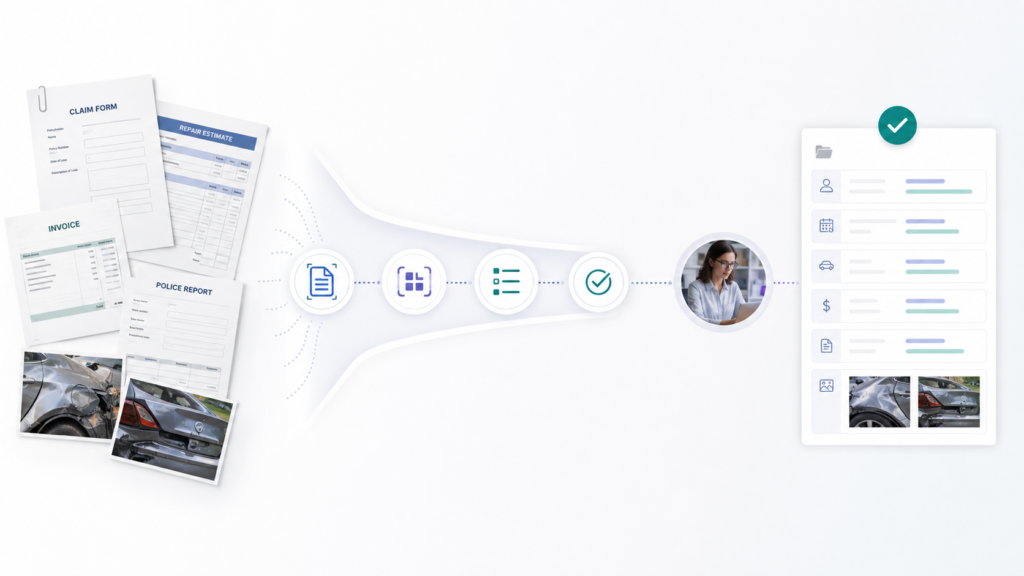
A single claim may include a claim form, repair estimate, invoice, police report, medical document, damage photos, email attachments, policy information, and supporting documents from different people.
The difficult part is not simply storing these files. Someone has to open them, understand what each document is, find the important information, enter that information into the claims system, check whether something is missing, and send unclear cases to the right person.
This is one of the areas where AI can be genuinely useful.
But the goal should not be to let an AI model decide whether a claim should be accepted or rejected. A much safer and more practical starting point is to use AI to turn incoming documents into structured, checked information that a claims team can review much faster.
In this article, we will walk through how that system can actually work, where AI should be used, where normal business rules are better, and where a human should remain involved.
What insurance claims document processing actually involves
Imagine that a customer submits an auto insurance claim.
The insurer might receive:
- A first notice of loss form
- A police report
- Photos of the damaged vehicle
- A repair estimate
- An invoice
- Driver information
- Emails from the customer or repair shop
These files may arrive through a website, mobile application, email inbox, broker portal, API, or an existing claims management system.
A claims employee may then need to answer basic questions before the claim can move forward.
- What type of document is this?
- Which claim does it belong to?
- What is the policy number?
- What is the date of loss?
- Who submitted the document?
- What amount appears on the estimate or invoice?
- Are required documents missing?
- Does the information match what is already stored?
- Does anything need manual review?
None of these tasks require AI to make the final claims decision. They require the system to read, organize, extract, compare, and route information correctly.
That distinction matters.
What AI should automate first
The best first use of AI in claims processing is usually document handling, not claim approval.
A useful system should be able to:
- Receive the document.
- Identify the document type.
- Extract the fields required for that document.
- Compare those fields with existing claim and policy data.
- Check whether important information is missing or inconsistent.
- Measure how confident the extraction is.
- Send uncertain cases to a human.
- Update the claims system after the data has passed the required checks.
This creates a much more controlled workflow than simply uploading a PDF to a large language model and asking it what to do.
Modern document processing services already support many parts of this workflow. For example, Google Cloud Document AI supports document classification, splitting, OCR, and structured data extraction. Microsoft also describes insurance claims processing as a document workflow where information can be extracted, validated, scored, and sent for human review when confidence is lower.
A practical AI claims document processing workflow
Let us look at the workflow step by step.
Step 1: Receive and store the original document
The first step should happen before AI does anything.
Every incoming file should be stored with basic information such as:
- Claim ID
- Customer or account ID
- Upload source
- Original filename
- Upload time
- Document ID
- Processing status
Keep the original document.
Do not replace the original file with the extracted AI output. If somebody later needs to verify an amount, date, name, or decision, the original source should still be available.
The processing system can then work from a controlled copy of that document.
Step 2: Identify what type of document it is
This step is often skipped, and that creates problems later.
A police report should not be processed exactly like an invoice. A repair estimate should not use the same extraction rules as a medical bill.
The system should first classify the document into a known type.
For example:
- Claim form
- Repair estimate
- Invoice
- Police report
- Medical document
- Identity document
- Policy document
- Damage photo
- Other supporting document
If the system cannot confidently identify the type, it should place the file in an unknown document queue instead of guessing.
This is also how real document automation systems are commonly designed. In one Google Cloud insurance claims example, document classification and separate extraction methods for different document types were important parts of the claims automation workflow.
Step 3: Extract only the information you actually need
Once the document type is known, extraction becomes much easier to control.
For a repair estimate, the system may need:
- Claim number
- Vehicle information
- Repair shop
- Estimate date
- Parts total
- Labor total
- Tax
- Total estimate amount
For a police report, the required fields might be completely different.
- Report number
- Incident date
- Incident location
- People involved
- Vehicle details
- Officer or agency information
Do not ask the AI to return everything it can find.
Define a clear schema for every document type and request only those fields.
A simplified output could look like this:
{
  "document_type": "repair_estimate",
  "claim_number": "CLM10284",
  "estimate_date": "2026-07-22",
  "repair_shop": "Example Auto Repair",
  "total_amount": 4280.50,
  "currency": "USD",
  "confidence": {
    "claim_number": 0.99,
    "estimate_date": 0.97,
    "repair_shop": 0.94,
    "total_amount": 0.98
  }
}
This is much more useful to an insurance application than a paragraph generated by an AI model.
Step 4: Validate the extracted information
Extraction and validation are different jobs.
If AI reads a claim number from a PDF, the system should not immediately assume that number is correct.
It can check whether:
- The claim exists.
- The claim belongs to the correct customer.
- The policy number matches the claim record.
- The loss date matches information already provided.
- The invoice total can be calculated from its line items.
- The document is a duplicate of one already received.
- A required field is missing.
This is where normal application logic is often more useful than another AI call.
AI extracts the value. Your software decides how that value should be checked.
This same separation between AI and application control is important in other enterprise systems. We covered the broader architecture behind this in our guide to building reliable AI systems with queues, logs, retries, and state.
Step 5: Use confidence scores to decide what needs review
Not every extracted field should be treated equally.
If the system is very confident that it has correctly read a repair shop name, that may be low risk.
If it is unsure about a claim number, payment amount, policy number, or loss date, that can be much more important.
Document processing systems such as Amazon Textract return confidence information with extraction results. AWS specifically recommends considering confidence scores together with the sensitivity of the use case in its Amazon Textract best practices.
For an insurance system, this should normally be handled at field level.
For example:
| Field | Confidence | Possible action |
|---|---|---|
| Repair shop name | 99% | Accept |
| Estimate date | 98% | Accept |
| Total amount | 91% | Verify with business rules |
| Claim number | 72% | Send for human review |
The exact thresholds should be decided using your own documents, risk level, testing results, and business requirements.
A fixed number such as 90% should not automatically become the rule for every field.
Step 6: Send unclear information to a human review queue
Human review should not mean that somebody has to process the entire document again.
The system should show the reviewer exactly what needs attention.
A useful review screen might show:
- The original document on one side
- The extracted fields on the other side
- The uncertain field clearly highlighted
- The confidence value
- Existing claim information for comparison
- Any failed validation rule
- Approve, correct, or reject actions
If only one field is uncertain, the employee should review that field instead of repeating the entire data entry process.
This is where a document automation project starts creating real operational value.
The goal is not to remove people from the process. It is to stop people from spending time on information the system already understands reliably.
Step 7: Update the existing claims system
Once the information has passed the required checks, it can be sent to the existing claims platform through an API, integration service, database layer, or approved workflow.
At first, it is usually safer to keep this integration limited.
For example, the AI workflow could:
- Add extracted document fields
- Attach the processed document to the claim
- Mark required documents as received
- Create a review task
- Add a document summary
- Flag a mismatch
It does not need permission to approve a claim, issue a payment, or change policy coverage simply because it can read documents.
Giving an AI system only the permissions it actually needs is one of the principles we discuss in our guide on keeping AI useful without giving it too much control.
Step 8: Keep a complete audit trail
Every important step should be recorded.
For example:
- Which document was processed
- Which model or extractor processed it
- Which fields were extracted
- The confidence for each important field
- Which validation rules passed or failed
- Whether a human changed anything
- Who approved the correction
- What was finally written to the claims system
- When each action happened
This is useful for debugging, quality checks, audits, complaints, model changes, and compliance reviews.
It also makes future improvement easier because human corrections can show exactly where the automation is failing.
For a deeper look at ownership, approvals, monitoring, and accountability, read our article on how to govern AI agents in enterprise systems.
Where should a large language model be used?
Not every part of claims document processing needs an LLM.
This is important because many AI projects become unnecessarily expensive and unpredictable when every step is sent through a language model.
Traditional OCR and document extraction tools are often better for clearly structured information such as:
- Names
- Dates
- Invoice totals
- Policy numbers
- Claim numbers
- Form fields
- Tables
A language model can be more useful when the information is less structured.
For example, it can help with:
- Summarizing a long adjuster report
- Extracting key events from an email conversation
- Understanding a free form incident description
- Creating a short summary of multiple documents
- Identifying information that may require attention
- Normalizing differently written descriptions into a consistent format
The important part is that an LLM output should still pass through the same permission, validation, and review controls as the rest of the application.
If you are deciding between a normal LLM workflow, retrieval, or a more complete agent system, our article on LLM vs RAG vs agent systems explains where each approach fits.
What should AI not decide automatically?
There is a big difference between extracting information from an insurance claim and making a decision that affects the policyholder.
An AI system reading an invoice total is one thing.
An AI system deciding whether a claim should be denied is very different.
The National Association of Insurance Commissioners makes clear that insurers remain responsible for complying with insurance laws and consumer protection requirements when AI is used, including when AI supports claims decisions.
Because of that, the automation boundaries should be defined before development starts.
| Task | Good automation candidate | Human control recommended |
|---|---|---|
| Classify a document | Yes | Only when uncertain |
| Extract an invoice amount | Yes | Review low confidence results |
| Check whether documents are missing | Yes | Usually not required |
| Summarize an adjuster report | Yes | Review when used for important decisions |
| Compare extracted information with claim records | Yes | Review meaningful conflicts |
| Determine claim coverage | Use caution | Strong human and compliance controls |
| Deny a claim | High risk | Human and regulatory controls should remain central |
| Issue a payment | High risk | Require approved business workflow |
Insurance requirements vary by jurisdiction, product, and insurer. Legal and compliance teams should define the final rules for any production claims workflow.
How to handle bad scans and difficult documents
Real claims documents will not all be perfect PDFs.
You may receive:
- Blurred phone photos
- Rotated pages
- Handwritten notes
- Low resolution scans
- Multiple documents inside one PDF
- Pages in the wrong order
- Documents with tables
- Different layouts from different repair shops or hospitals
- Incomplete forms
Your workflow needs to expect this from the beginning.
If a document cannot be processed reliably, the correct response is not to force the AI to produce an answer.
The system should be able to say:
This document needs manual review.
You can also add preprocessing before extraction, such as page rotation, image quality checks, document splitting, or duplicate detection.
More importantly, test the system using the same messy documents that appear in real operations.
A demo built with ten perfect PDFs tells you very little about how the system will behave in production.
We covered this testing mindset in more detail in how to test AI agents before putting them in production.
Security matters because claim documents contain sensitive data
Claims systems may process personal information, financial information, medical information, identity documents, addresses, vehicle information, payment information, and other sensitive records.
That means the AI layer should not become a shortcut around the security already built into the insurance platform.
A production system should consider:
- User and service authentication
- Role based access
- Claim level access checks
- Encryption in transit and at rest
- Controlled document storage
- Limited AI model access
- Data retention policies
- Logging of sensitive actions
- Separation between customers or business units
- Vendor and model data handling policies
The AI model should receive the minimum information required for the current task.
For example, an extraction service reading a repair estimate does not automatically need access to every document, payment record, and customer record connected to that policyholder.
We explain these controls more deeply in AI security for business and protecting data, agents, and tool access.
How should an insurance company start implementing this?
Do not begin by trying to automate the entire claims department.
Choose one line of business, one workflow, and a small number of document types.
For example:
Auto claims plus repair estimates, invoices, and police reports.
That is a much better starting point than trying to support every document used across auto, home, health, travel, and commercial insurance at the same time.
Phase 1: Understand the current manual process
Before writing AI code, sit with the people currently processing claims.
Find out:
- Where documents arrive
- Which document types appear most often
- Which fields employees manually enter
- Which checks they perform
- Which errors happen repeatedly
- Which cases always require a senior reviewer
- Where the information is stored after review
This becomes the real system specification.
Phase 2: Build extraction without automatic actions
Start by letting the system read documents and produce structured fields.
Do not automatically update production records yet.
Run the AI output beside the current human process and compare the results.
This is sometimes called shadow testing. It gives the team a realistic view of extraction quality without allowing mistakes to affect a live claim.
Phase 3: Add validation and review queues
Once extraction is reliable enough, add business rules and confidence based review.
The goal should be to separate documents into simple groups:
- High confidence and valid
- Needs human review
- Failed processing
Do not hide failures.
A visible failure queue is much safer than an AI system silently guessing.
Phase 4: Connect the claims system
After the team trusts the extraction and validation process, connect it to the existing claims application.
Start with low risk actions such as adding extracted information, creating tasks, attaching summaries, or marking documents as received.
More sensitive actions should remain behind existing approval and business workflows.
Phase 5: Expand based on real corrections
Human corrections are valuable data.
If reviewers repeatedly correct the same field from the same document type, you now know exactly what needs improvement.
You may need to:
- Improve preprocessing
- Use a different extractor
- Change the extraction instructions
- Add more examples
- Improve document classification
- Change a confidence threshold
- Add a business validation rule
This is much more useful than changing the AI model every time an error appears.
What should you measure?
Do not measure the success of a claims document system by asking whether the AI appears intelligent.
Measure whether the workflow actually becomes better.
Useful metrics include:
- Extraction accuracy by field
- Document classification accuracy
- Percentage of documents requiring human review
- Percentage of extracted fields corrected by humans
- Average document processing time
- Average human review time
- Processing failure rate
- Duplicate detection rate
- Cost per processed document
- Time from document arrival to usable claim data
You should also break these numbers down by document type.
A system that works extremely well on invoices but poorly on police reports should not be described using one average accuracy number.
The important question is not:
How accurate is our AI?
A better operational question is:
Which documents and fields can we process reliably, and where does a human still need to step in?
Common mistakes when automating insurance claims documents
Using one AI prompt for every document
Different documents contain different information and require different checks. Classify the document first, then process it using the correct extraction logic.
Sending the entire claim to an LLM
This increases cost, makes permissions harder to control, and gives the model information it may not need. Send only the context required for the current task.
Trusting extracted values without validation
AI extraction should be followed by normal application checks whenever possible.
Using one confidence threshold for everything
The importance of a repair shop name is not the same as the importance of an invoice amount or claim number. Thresholds should consider the field and its risk.
Removing human review too early
The first goal should be faster review, not zero review.
Automating decisions because document extraction works
Reliable data extraction does not automatically mean the same system should make coverage, settlement, denial, or payment decisions.
Not keeping the original document
Reviewers should always be able to compare extracted information with its original source.
Not recording human corrections
Corrections tell you where the system fails. If they are not stored, you lose one of the best sources of information for improving the workflow.
A simple architecture for an AI claims document system
A practical architecture might look like this:
Claim portal, email, API, or existing claims system
                    |
                    v
            Document intake
                    |
                    v
      Secure original file storage
                    |
                    v
       Document classification
                    |
                    v
     Document specific extraction
                    |
                    v
        Structured claim data
                    |
                    v
   Confidence and business validation
           /                 \
          /                   \
 High confidence          Needs review
      |                        |
      v                        v
Approved workflow       Human review queue
          \                   /
           \                 /
                    v
          Existing claims system
                    |
                    v
             Audit and logs
The important part is not which cloud provider or AI model you choose.
The important part is the separation between extraction, validation, permissions, human review, business actions, and audit logs.
That separation makes the workflow easier to test, change, secure, and explain.
Final thoughts
Insurance claims document processing is a good AI use case because the problem is clear.
Claims teams already receive documents. Employees already spend time reading them, finding information, checking that information, and moving it into other systems.
AI can reduce that work without becoming the final decision maker.
A practical system can classify incoming documents, extract the fields a claims team needs, validate them against existing data, identify uncertain information, and send only those cases to a human reviewer.
That is usually a much better starting point than trying to build an autonomous claims agent.
Start with one claims workflow. Define the document types. Define the exact fields. Add validation. Keep the human review path. Measure corrections. Then expand only when the system proves that it can handle the work reliably.
If your insurance company or software team is planning a workflow like this, Byteonic Labs works as an AI implementation partner to design and integrate AI into existing business systems while keeping permissions, validation, reliability, and human control around the workflow.
AI can read incoming claim documents, identify the document type, extract important information, check whether data is missing, and send unclear cases for human review. This can reduce the manual work claims teams spend opening documents and entering the same information into claims software.
AI can process many common claim documents, including claim forms, repair estimates, invoices, police reports, medical documents, policy documents, emails, and supporting records. Different document types should normally use their own extraction rules instead of being processed with one generic prompt.
AI can support claims processing, but document automation should not automatically mean claim approval or denial. A safer approach is to use AI for reading, extracting, checking, and summarizing information while keeping important coverage, payment, and denial decisions inside controlled business and human review processes.
Accuracy depends on the document type, scan quality, extraction system, fields being extracted, and the documents used for testing. Instead of trusting one overall accuracy number, insurers should measure accuracy for important fields such as claim numbers, dates, policy numbers, and payment amounts separately.
The system should not guess. Low confidence fields, failed validation checks, or unknown documents should be sent to a human review queue where an employee can compare the extracted information with the original document and correct it if needed.
Yes. The AI workflow can normally sit between document intake and the existing claims system. After information is extracted and validated, approved data can be sent to the current claims platform through APIs, integration services, or existing workflow tools without rebuilding the entire claims application.
The AI system should only receive the information required for the current task. Insurers should keep authentication, permissions, encryption, document access, audit logs, data retention rules, and customer separation around the AI workflow just as they would for other sensitive insurance systems.
Start with one claims workflow and a small number of common document types. For example, an auto claims team could begin with repair estimates, invoices, and police reports, measure how accurately they are processed, keep human review in place, and expand only after the workflow becomes reliable.