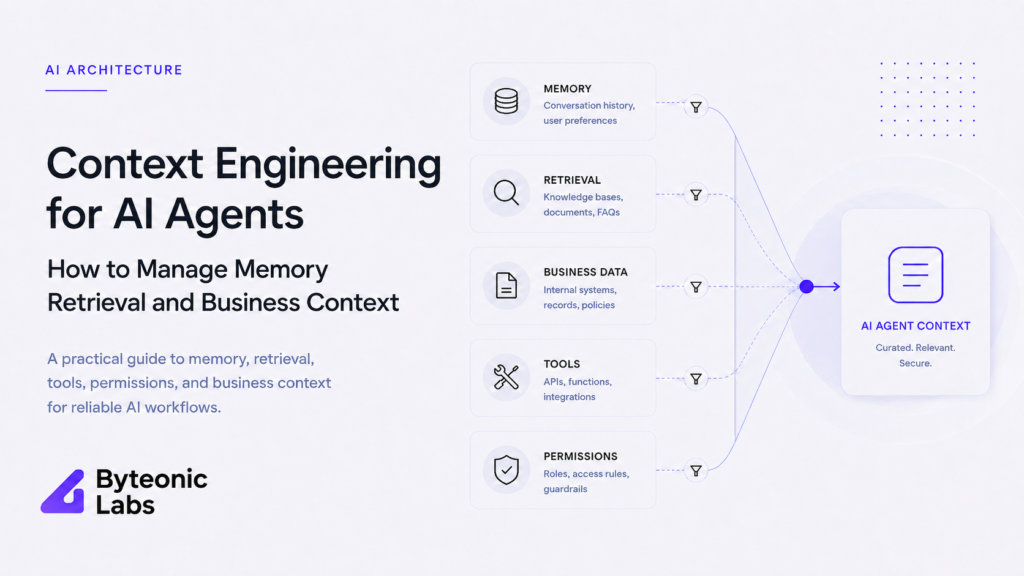
Context Engineering for AI Agents How to Manage Memory Retrieval and Business Context
Published on July 22, 2026
Use AI to summarize this article
 ChatGPT
 Claude
 Grok
Grok Perplexity
 GoogleAI
A strong AI model can still give a poor result when it receives the wrong information.
The prompt may be clear. The model may be capable. The tools may work correctly. But if the agent receives old records, irrelevant conversation history, too many tool descriptions, or data from the wrong customer, the final result will still be unreliable.
This is the problem context engineering solves.
Context engineering for AI agents is the process of deciding what information the model should receive at each step of a workflow. It includes instructions, memory, retrieved documents, business data, user permissions, available tools, tool results, and the current state of the task.
The goal is not to give the agent as much information as possible. The goal is to give it the smallest set of information needed to complete the current task correctly.
What is context engineering for AI agents
Context engineering is the design of the information environment around an AI model.
It decides what the model can see before it generates a response or selects an action. This may include the user request, system instructions, account details, previous decisions, retrieved documents, tool definitions, and live business records.
Anthropic describes context engineering as the work of curating and maintaining the right set of tokens during model inference. Google Cloud describes it as a broader architecture that connects instructions, memory, data pipelines, tools, and application state.
You can read Anthropic’s guide to effective context engineering for AI agents and Google Cloud’s overview of AI context engineering for their full explanations.
In practical terms, context engineering answers one question:
What does this agent need to know right now to complete this step safely and correctly?
Prompt engineering and context engineering are not the same
Prompt engineering focuses on how instructions are written. Context engineering focuses on the full set of information provided to the model.
| Area | Prompt engineering | Context engineering |
|---|---|---|
| Main focus | How the instruction is written | What information the model receives |
| Typical inputs | Rules, examples, tone, and output format | Instructions, memory, data, tools, permissions, and workflow state |
| Scope | Usually one model call | The full agent workflow |
| Main risk | Unclear or weak instructions | Missing, stale, conflicting, or excessive information |
| Business value | Improves how the model follows a request | Improves reliability across real business processes |
A well written prompt cannot fix incorrect business data. It cannot repair missing permissions. It cannot identify the right customer record if the retrieval system returns the wrong one.
Prompt engineering is part of context engineering, but it is only one part.
The six layers of context an enterprise AI agent needs
A reliable enterprise agent usually needs six clear context layers. Each layer has a different purpose and should be managed separately.
1. Instructions
Instructions tell the agent what job it is performing, what rules it should follow, and what output it should produce.
These instructions should be direct and stable. They may define the agent role, required response format, business rules, prohibited actions, and escalation conditions.
Instructions should not contain passwords, API keys, private tokens, or sensitive business secrets. A system prompt helps guide model behaviour, but it is not a secure storage location or an access control system.
2. User and tenant identity
The agent needs to know who started the request and what that person is allowed to access.
In an enterprise application, this may include the user ID, organisation ID, role, department, subscription level, region, and document permissions.
This layer is essential for multi tenant systems. The agent should never receive another customer’s records simply because they are semantically relevant to the question.
Permissions should be applied before data enters the context. The model should not be expected to remove information that the user was never allowed to receive.
3. Current workflow state
An agent working through several steps needs to know what has already happened.
Workflow state may include the current task, completed steps, pending approvals, failed tool calls, retry count, selected customer, active order, and final action status.
This state should usually live in a durable database. The model context should receive only the parts needed for the current step.
Our article on AI architecture behind reliable AI agents explains how queues, workers, PostgreSQL, Redis, retries, logs, and workflow state work together in production systems.
4. Relevant business data
Business context may come from a CRM, database, accounting platform, support system, product catalogue, document store, analytics service, or internal API.
The agent should not receive every available record. It should receive the records that are relevant to the current task and allowed for the current user.
For example, a support agent answering a billing question may need the customer account, active plan, recent invoices, payment status, and related policy. It does not need the complete customer database.
5. Available tools
Tools define what the agent can do. A tool may search documents, read an account, update a CRM record, create a draft, calculate a value, or trigger an internal workflow.
Giving every tool to every agent increases context size and makes tool selection harder. The better approach is to load only the tools relevant to the current task.
Anthropic has shown that tool definitions can consume a large amount of context when an agent has access to many integrations. Its work on using code execution with MCP explains how loading tools on demand and filtering data before it reaches the model can reduce context use.
6. Memory from previous interactions
Memory helps an agent use information from previous conversations or workflows. This may include user preferences, previous decisions, unresolved issues, approved settings, or a summary of earlier work.
Memory should not mean copying the complete conversation into every request. Old conversations often contain repeated, outdated, or conflicting information.
A better system stores memory in a structured form and retrieves only what is useful for the current task.
Why more context can make an AI agent worse
A large context window does not mean every available piece of information should be inserted into it.
When context becomes crowded, important instructions can compete with irrelevant details. Old decisions may conflict with current records. Repeated tool results may increase cost without adding value. The model may focus on information that looks relevant but is no longer correct.
This problem is sometimes called context rot. As more information is added, the model can become less consistent because the useful signal is buried inside unnecessary content.
Common causes include:
- Sending the complete conversation history on every request
- Loading every available tool definition
- Retrieving too many documents
- Including raw tool responses with hundreds of unused fields
- Mixing old and current business records
- Repeating the same instruction in several places
- Using summaries that are no longer accurate
- Combining information from different users or tenants
The solution is not always a larger model or a larger context window. The solution is better selection.
A context window is not a database
The context window is temporary working space for the model. It should not be treated as the permanent source of truth.
Important business records should remain in databases, document stores, CRM systems, or other controlled services. The application should retrieve the required information when the agent needs it.
This gives the business more control over data freshness, permissions, retention, and audit history.
For example, an account status should come from the current account record. It should not come from an old conversation summary. An approval status should come from the workflow database. It should not depend on whether the model remembers an earlier message.
Memory and RAG solve different problems
Memory and retrieval augmented generation are related, but they are not the same.
Memory stores information from previous interactions or workflows. RAG retrieves external knowledge that is relevant to the current question.
Memory may include a user preference, an earlier decision, or the current task state. RAG may retrieve a company policy, product document, support article, contract, or financial report.
An enterprise agent may need both.
For example, a sales agent may remember that a customer prefers email communication. It may then retrieve the latest pricing policy and account details before preparing a follow up draft.
Our guide on LLM vs RAG vs agent systems explains when retrieval and agents solve different business problems.
Short term memory and long term memory
Memory should be separated based on how long the information remains useful.
Short term memory
Short term memory supports the current conversation or workflow. It may contain the current request, recent messages, selected records, active task plan, and tool results.
This memory usually changes quickly and may be removed after the workflow finishes.
Long term memory
Long term memory stores information that may be useful in future sessions. It can include stable preferences, verified facts, completed decisions, account settings, and summaries of important past work.
Long term memory should be selective. Saving every message creates noise and may preserve incorrect information.
OpenAI’s session memory guide describes practical patterns for trimming old history and summarising earlier messages. These patterns help keep the active context focused as conversations become longer.
How to decide what should become memory
Before storing information as memory, check whether it is useful, stable, permitted, and likely to matter again.
A practical memory rule can ask:
- Will this information be useful in a future request?
- Is the information verified?
- Does the user expect the system to remember it?
- Is the information still likely to be correct later?
- Is the system allowed to store it?
- When should it expire or be reviewed?
A temporary error message should not become long term memory. A confirmed customer preference may be useful. A draft decision should not replace the final approved decision.
Memory should also include a source and timestamp where possible. This helps the application resolve conflicts between old and new information.
How retrieval should work in a context pipeline
Retrieval should not begin with a vector search alone.
A reliable retrieval process should first identify the user, tenant, task, data source, and permission boundary. Only then should it search for relevant content.
A practical flow may include:
- Identify the user and organisation
- Check the user role and data permissions
- Classify the request
- Select the correct data source
- Apply tenant and document filters
- Run keyword, vector, or hybrid search
- Rank the returned results
- Remove duplicates and low value content
- Pass only the best evidence into the model context
- Store the sources used for later review
This is especially important when the AI works with private business data. A relevant document is not automatically an allowed document.
A practical context engineering pipeline
A production context pipeline should assemble information in a controlled order.
User request
Identity and permission check
Task classification
Load current workflow state
Retrieve relevant memory
Retrieve allowed business data
Select required tools
Compress and organise context
Call the model
Validate the output
Execute or request approval
Save workflow state and useful memory
Each step should have a clear responsibility.
Understand the request
The system first identifies what the user is asking and whether the request belongs to the agent’s role. A broad request may need clarification before more data is loaded.
Apply identity and permissions
Permissions should be checked before retrieval and tool selection. This prevents unauthorised information from reaching the model.
Load workflow state
The application loads the current task record, completed steps, previous tool results, and any pending approvals.
Retrieve memory
Only relevant memories should be loaded. Stable preferences and recent decisions may be useful. Unrelated conversations should stay outside the active context.
Retrieve business data
The system queries the correct database, document store, or business application. Results should be filtered and reduced before being passed to the model.
Select tools
The agent receives only the tools needed for the current task. A support request does not need finance administration tools. A reporting workflow does not need account deletion access.
Compress and organise context
Large documents and tool outputs should be summarised, filtered, or converted into structured fields. Important instructions should remain easy for the model to identify.
Validate the output
The application should check required fields, citations, permissions, tool arguments, and business rules before using the model output.
Save useful state
The workflow result should be stored in the application database. Only verified and reusable information should be written into long term memory.
Context compression keeps agents focused
Long workflows can produce large amounts of data. Tool calls may return full records, documents, API responses, and logs. Passing all of this back into every model call is expensive and unnecessary.
Context compression reduces the information while preserving what matters.
Useful approaches include:
- Summarising older conversation turns
- Keeping structured facts instead of full messages
- Removing duplicate documents
- Extracting only required fields from tool results
- Storing large outputs outside the context window
- Keeping references to previous results instead of repeating them
- Separating completed steps from active steps
- Removing tools that are no longer required
Compression should not remove information blindly. The system should preserve decisions, constraints, source records, unresolved issues, and anything needed for safe execution.
Tool selection is part of context engineering
Tool selection is often treated as an agent capability problem. It is also a context problem.
If an agent receives fifty similar tools, it has to compare fifty descriptions before choosing one. This increases token use and creates more opportunities for incorrect selection.
A better design uses tool groups or staged discovery.
For example, the system may first classify the request as sales, finance, support, or operations. It can then load only the tools from that group. A second step may narrow the list further based on the requested action.
Tool descriptions should also be clear. Each description should state what the tool does, what inputs it expects, what it returns, and when it should not be used.
Tools still need normal application security. Context engineering helps the model select a tool, but permissions and input validation must be enforced in code.
Context must follow enterprise permissions
Context engineering is incomplete without security and governance.
An agent may select highly relevant information and still create a security incident if the user was not allowed to access it.
For every context source, define:
- Which users and roles can access it
- Which tenant owns the data
- Which fields may enter the model context
- Whether personal or regulated information is included
- How long the context may be stored
- Whether the data can be sent to an external model provider
- What information must be removed from logs
Our article on AI security for business covers data access, prompt injection, tool permissions, secure RAG, and approval boundaries in more detail.
For broader ownership and lifecycle controls, read how to govern AI agents in enterprise systems.
Context observability is necessary in production
When an agent gives a poor answer, the team needs to know what information it received.
Without context observability, developers may blame the model when the real problem was stale memory, missing data, weak retrieval, or the wrong tool set.
A production system should record:
- The context sources selected
- The memory records used
- The documents retrieved
- The permission filters applied
- The tools made available
- The tool results included
- The number of tokens used
- The context that was compressed or removed
- The model and prompt version
- The final result and user correction
Sensitive values should be masked or excluded. The goal is to make the workflow traceable without creating another source of data exposure.
How to evaluate a context engineering system
A context pipeline should be tested separately from the model.
Create realistic requests and verify whether the system selects the correct memory, documents, records, and tools.
Useful measures include:
- Retrieval relevance
- Permission accuracy
- Memory selection accuracy
- Tool selection accuracy
- Incorrect source rate
- Stale information rate
- Context token usage
- Response time
- Cost per completed task
- Human correction rate
Testing should also include missing data, conflicting records, invalid permissions, long conversations, failed tools, and requests that do not belong to the agent’s role.
Our guide on how to test AI agents before production explains sandbox testing, evaluation sets, retries, permissions, approvals, logs, and controlled rollout.
Context engineering examples in business workflows
Customer support
A support agent may need the current ticket, customer account, recent product events, relevant support articles, refund rules, and a limited set of ticket tools.
It does not need unrelated customer accounts, the full support knowledge base, or finance administration tools.
Sales
A sales agent may need the lead record, recent communication, company profile, product details, pricing rules, and approved outreach templates.
It may remember communication preferences, but it should retrieve current pricing from the source system rather than relying on old memory.
Finance
A finance agent may need recent transactions, account balances, budget rules, approved reporting definitions, and the current reporting period.
It should not mix records from different companies or use an earlier draft report as the final source of truth.
Internal knowledge
An internal knowledge agent may retrieve policies, technical documents, meeting decisions, and project records.
Document permissions and publication status should be checked before content enters the context. Draft documents should not silently override approved policies.
Common context engineering mistakes
- Treating the full conversation as useful memory
- Loading all available tools into every request
- Using vector similarity without permission filters
- Passing raw API responses directly to the model
- Allowing old memory to override current business records
- Saving every user statement as a permanent fact
- Using the context window as the main database
- Ignoring tenant and role boundaries
- Changing context rules without evaluation
- Logging sensitive context without proper masking
A practical context engineering checklist
- Define the agent’s role and allowed tasks
- Identify every source that can enter the context
- Apply identity and permission checks before retrieval
- Separate workflow state, memory, and business records
- Retrieve only data relevant to the current task
- Load only the tools needed for the current step
- Compress large tool results and old history
- Validate model outputs before actions are executed
- Store durable state outside the context window
- Track the sources and memory used for each run
- Test context selection with realistic examples
- Review memory retention and expiry rules
Final thoughts
Context engineering for AI agents is not about filling a larger context window. It is about selecting the right information at the right time.
A reliable agent needs clear instructions, verified identity, current workflow state, relevant business data, limited tools, and useful memory. These layers should be assembled by the application instead of being left to the model.
The model can only work with the information it receives. If the context is incomplete, stale, excessive, or unauthorised, the result will be weak even when the model itself is strong.
Good context engineering improves accuracy, cost, response time, security, and trust because the agent receives less noise and more useful evidence.
If your business needs help designing memory, retrieval, permissions, tool access, and production workflows, Byteonic Labs works as an AI implementation partner for secure and reliable AI systems.
Context engineering is the process of deciding what information an AI agent receives at each step. This can include system instructions, conversation history, user identity, workflow state, business records, retrieved documents, available tools, and permissions.
Prompt engineering focuses on how instructions are written. Context engineering manages the complete information supplied to the model. A strong prompt cannot fix missing records, stale memory, incorrect permissions, or irrelevant documents.
AI agents often fail because they receive the wrong information, not because the model is weak. Good context engineering helps the agent use relevant data, select the correct tools, follow permissions, reduce unnecessary tokens, and make more reliable decisions.
Yes. Too much context can hide important instructions inside irrelevant history, duplicate records, old tool results, and unnecessary documents. The goal should be to provide the smallest useful context for the current task, not everything the system can access.
No. A larger context window only allows the model to receive more information. It does not guarantee that the information is relevant, current, accurate, or permitted. The application still needs to select, filter, organise, and validate the context.
AI memory stores useful information from previous conversations or workflows, such as preferences, decisions, or task state. RAG retrieves external knowledge, such as policies, documents, product information, or business records, when it is needed for the current request.
An AI agent usually needs clear instructions, verified user and tenant identity, current workflow state, relevant business data, a limited set of tools, and useful memory from previous interactions. The exact context should depend on the task being completed.
Short term memory should hold information needed for the current conversation or workflow. Long term memory should store only verified information that may be useful later. Businesses should avoid saving every message and should define when stored memory expires or needs review.
Apply user roles, tenant boundaries, document permissions, and field level access before information reaches the model. The AI should receive only the data required for the task. Security rules should be enforced by the application, not trusted to the prompt.
The agent should receive only the tools required for the current workflow. Loading every available integration increases token use and makes incorrect tool selection more likely. Tool permissions, input validation, and action limits should still be enforced in code.
Test whether the system selects the correct memories, documents, business records, and tools for realistic requests. Measure retrieval relevance, permission accuracy, stale information, token usage, response time, tool selection, cost, and the number of human corrections required.