Small Language Models vs Large Language Models for Business
Published on July 18, 2026
Use AI to summarize this article
 ChatGPT
 Claude
 Grok
Grok Perplexity
 GoogleAI
Many businesses start an AI project by choosing the largest model they can afford. The assumption is simple. A larger model must produce better results.
That assumption is often wrong.
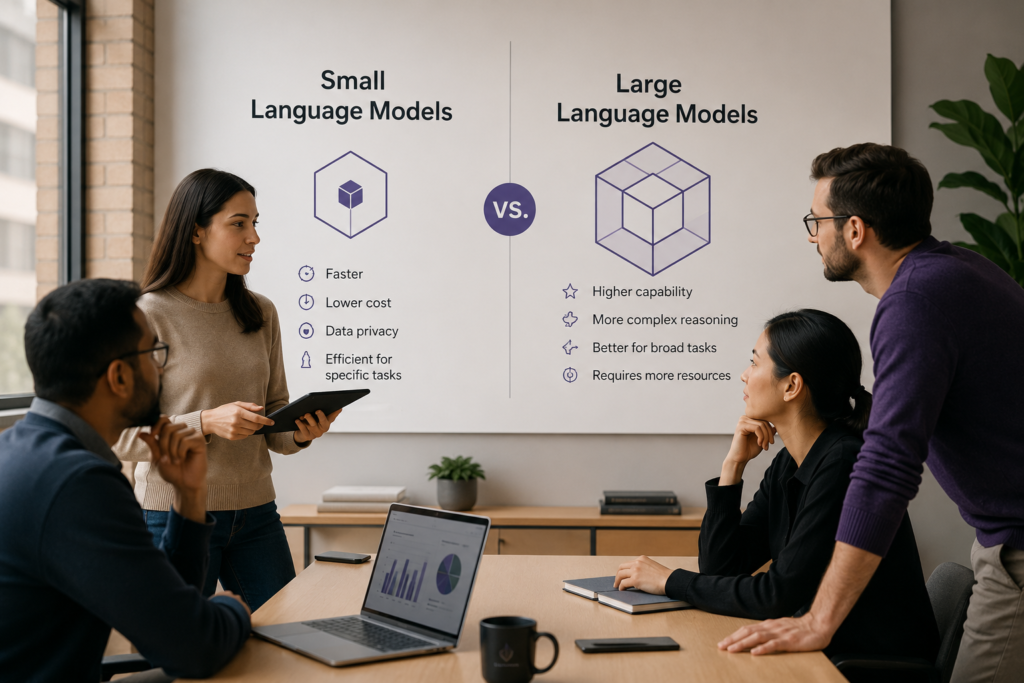
Large language models are useful when a task requires broad knowledge, complex reasoning, long responses, or the ability to handle many different types of requests. But a large model can be unnecessary for focused work such as classifying emails, extracting fields from documents, routing support tickets, creating short summaries, or calling a known business function.
For these tasks, a small language model may be faster, cheaper, easier to deploy, and easier to control.
The right question is not whether small language models are better than large language models. The right question is which model is suitable for the work your application needs to complete.
What is a small language model
A small language model is a compact model designed to understand and generate language while using fewer computing resources than a large language model.
There is no universal parameter count that separates a small language model from a large one. The terms are relative. A model considered small today may still contain billions of parameters, but it needs much less memory and computing power than a larger general purpose model.
Small language models are often designed or tuned for a narrower set of tasks. They can run inside a private cloud, on a local server, beside an application, or in some cases directly on a laptop, phone, vehicle, or other edge device.
IBM explains that small language models require less memory and computing power, which makes them suitable for resource limited environments and offline processing. You can read its overview of small language models for a broader technical explanation.
What is a large language model
A large language model is trained on a broad and varied collection of data. It is designed to work across many topics and complete a wide range of language tasks.
Large models are usually stronger when the request is unclear, open ended, or complex. They are useful for work that requires deeper reasoning, broad knowledge, long document analysis, detailed code generation, or synthesis across several sources.
This flexibility comes with a cost. Larger models usually need more computing power, more memory, and more infrastructure. When accessed through an external API, they may also have higher usage costs and longer response times than smaller models.
Small language models vs large language models for business
The following comparison provides a practical starting point. Actual results depend on the model, infrastructure, workload, prompt, and quality of the test data.
| Decision area | Small language model | Large language model |
|---|---|---|
| Best fit | Focused and repeatable tasks | Broad and complex tasks |
| Response speed | Usually faster when deployed correctly | May be slower because more computation is required |
| Operating cost | Often lower for high volume focused workloads | Usually higher for repeated or complex requests |
| Deployment | Can often run locally or inside private infrastructure | Usually needs larger cloud or GPU infrastructure |
| Privacy control | Can keep processing inside the business environment | Depends on provider and deployment method |
| Complex reasoning | More limited outside its focused task | Usually stronger across difficult and unclear requests |
| General knowledge | Narrower knowledge and weaker generalisation | Broader knowledge across many domains |
| Customisation | Can be practical to tune for a specific task | Can be customised but may require more resources |
Microsoft also recommends comparing model types based on task complexity, cost, response time, and available resources rather than assuming one model type is always better. Its comparison of small and large language models covers these tradeoffs in more detail.
When a small language model makes sense
A small language model is a strong option when the task is narrow, repeated often, and easy to evaluate.
Text classification
Businesses process large amounts of text that needs to be placed into known categories. This can include routing support tickets, detecting customer intent, sorting emails, classifying documents, or assigning tags.
These tasks usually have a limited set of valid outputs. A smaller model can often complete them without the cost of a large general purpose model.
Structured data extraction
A small model can extract known fields from invoices, forms, emails, contracts, support tickets, and reports.
For example, the system may need to identify a customer name, invoice number, date, amount, product, complaint type, or requested action. The task is focused and the expected output can be validated against a schema.
Short summaries
A small model may be enough when the business needs short summaries of support tickets, meeting notes, call transcripts, product feedback, or internal reports.
The input and output should still be tested carefully. A smaller model may struggle when the source is very long, unclear, or contains several conflicting points.
Request routing
A small language model can act as a router inside a larger AI system. It can inspect a request and decide whether it should be handled by a fixed workflow, a retrieval system, a specialist model, or a larger model.
This can reduce the number of expensive model calls without reducing quality for difficult requests.
Known tool calls
A smaller model can be useful when it needs to choose from a limited set of tools with clear input fields. Examples include checking an order, creating a draft ticket, looking up an account, or retrieving a product record.
The application must still validate permissions and tool inputs in code. The model should not be treated as the security layer.
Local and offline applications
Small models can be deployed closer to the application and, in some cases, run without sending every request to an external model provider.
Microsoft documents an architecture where a small model runs beside a web application in a local container. This can provide local processing, predictable latency, fewer external dependencies, and greater control over where data is processed. Its local small language model deployment guide shows one practical implementation.
When a large language model is still the better choice
A small model should not be selected only because it is cheaper. If it cannot complete the task reliably, the lower model cost does not matter.
A large language model is usually a better fit when the task requires broad understanding, complex reasoning, flexible writing, or the ability to work with many unfamiliar situations.
Common examples include:
- Analysing several long documents and finding connections between them
- Answering open ended questions across many business areas
- Writing detailed technical or strategic content
- Handling complex code generation and debugging
- Reasoning through requests with many conditions and exceptions
- Working with conversations where user intent changes often
- Producing detailed explanations for unfamiliar problems
Large models are also useful during the early stage of a project when the team is still learning what users will ask. A flexible model may help validate the use case before the workflow is narrowed and optimised.
A smaller model does not automatically mean lower cost
This is an important point that model comparisons often miss.
A smaller model may need less computing power per request, but self hosting introduces other costs. The business may need GPU infrastructure, deployment pipelines, monitoring, security updates, scaling, model serving, and engineers who can operate the system.
If the model receives only a small number of requests, paying for unused infrastructure may cost more than using a managed model API.
Before choosing a small model, calculate the full operating cost:
- Infrastructure and GPU cost
- Model hosting and scaling
- Engineering and maintenance time
- Monitoring and logging
- Data preparation and evaluation
- Model tuning
- Security and access control
- Backup and recovery
Cost per token is only one part of the decision.
Privacy improves only when the full system is secure
Running a small model locally can reduce the need to send prompts and documents to an external service. This can be useful when the application handles private business data, legal documents, financial information, or regulated records.
Local deployment does not make the system secure by itself.
The business still needs access control, encryption, tenant isolation, audit logs, secure storage, permission checks, data retention rules, and protection around model inputs and outputs.
A private model connected to an insecure database is still an insecure application.
Fine tuning can improve a focused model
A small language model may not perform well enough out of the box. Fine tuning can improve its behaviour for a narrow task when the business has good training examples.
For example, a model can be tuned to classify industry specific documents, follow a required output format, identify known entities, or respond in an approved style.
Fine tuning should not be the first step. Start with prompting, clear output schemas, retrieval, and workflow rules. Fine tuning becomes useful when the task is stable, the same errors happen repeatedly, and the business has enough verified examples.
Google notes that tuning a smaller model can reduce latency and cost for high volume use cases when the task is well defined. Its fine tuning guide explains the main approaches.
We have also covered the full process in our guide on how to fine tune an AI model using Hugging Face.
RAG does not remove the need to choose the right model
Retrieval augmented generation gives a model access to relevant business documents at the time of a request. It can reduce the need for the model to remember every company fact.
However, retrieval does not automatically make a small model suitable for every task.
The model still needs to understand the question, use the retrieved information correctly, follow instructions, and create an accurate answer. A small model may work well for direct questions with clear evidence. A larger model may be needed when the answer requires comparing many sources or handling unclear instructions.
The right choice should be tested using your documents and real user questions.
For a broader explanation of how models, retrieval, and agents solve different problems, read our guide on LLM vs RAG vs agent systems.
The best architecture may use both
Most businesses do not need to choose one model for every request.
A hybrid architecture can send simple work to a small language model and complex work to a large language model. This is often called model routing.
A basic routing flow may look like this:
User request
Policy and permission check
Request classification
Small model for focused tasks
Large model for complex tasks
Output validation
Logging and monitoring
The small model can handle classification, extraction, short summaries, common questions, and known tool calls. The large model can handle unclear requests, complex reasoning, long analysis, and cases where the smaller model does not meet the required confidence level.
IBM describes a similar pattern where smaller models handle basic requests while larger models handle more complicated ones. NVIDIA researchers have also argued that specialised small models can handle many repeated tasks inside agent systems, with larger models used where broader reasoning is required. You can review the NVIDIA research paper on small models in agentic systems.
Routing adds engineering work, but it can improve cost control and response time when the application has enough traffic to justify it. It also needs proper state, retries, logs, and fallback rules. Our article on AI architecture behind reliable AI agents explains these production requirements.
Do not choose a model from public benchmarks alone
Public benchmarks can help remove obviously unsuitable models, but they do not prove that a model will work for your application.
A model may score well on general reasoning but fail to follow your output schema. It may answer common questions well but struggle with your industry language. It may have a large context window but fail to use all of the supplied context reliably.
The final decision should come from evaluation on your own workload.
How to choose between an SLM and an LLM
Use a repeatable evaluation process instead of choosing from marketing claims.
Define one clear task
Do not begin with “we need an AI model.” Define the actual work. For example, classify support tickets, extract invoice fields, summarise calls, answer policy questions, or draft account updates.
Create a realistic test set
Collect examples from the real workflow. Include normal cases, unclear inputs, missing data, long inputs, incorrect requests, and cases where the model should refuse or ask for help.
Define what a correct result means
Decide how quality will be measured. This may include field accuracy, classification accuracy, factual correctness, format compliance, tool selection, human review rate, or task completion.
Test several models under the same conditions
Use the same prompts, context, retrieval results, output schema, and test data. Otherwise, the comparison will not be useful.
Measure more than answer quality
Track these values for every model:
- Task success rate
- Incorrect answer rate
- Response time
- Cost per completed task
- Human correction rate
- Tool call accuracy
- Failure rate
- Infrastructure requirements
Choose the smallest model that meets the requirement
If a smaller model meets the required quality, speed, security, and cost target, using a larger model adds little value.
If the smaller model fails important cases, use a larger model or create a routing system. Do not lower the quality requirement only to justify a cheaper model.
Common mistakes businesses should avoid
- Using one large model for every task
- Selecting a small model only because it is cheaper
- Comparing models only with public benchmarks
- Ignoring the cost of operating a self hosted model
- Assuming local deployment solves every privacy problem
- Fine tuning before the workflow is stable
- Using model confidence as the only safety check
- Ignoring fallback behaviour when a small model fails
- Skipping evaluation on real business data
Final thoughts
Small language models and large language models solve different problems.
A small model is often the better choice for focused, repeated, high volume tasks where speed, privacy, and cost matter. A large model is usually better for complex, open ended work that requires broad knowledge and stronger reasoning.
For many enterprise applications, the best solution is not one model. It is an architecture that sends each task to the most suitable model.
Start with the business workflow. Define the quality requirement. Test with real data. Measure cost and response time. Then choose the smallest model that can complete the task reliably.
If your business needs help selecting, evaluating, and deploying the right model architecture, Byteonic Labs works as an AI implementation partner for production AI systems.
A small language model is designed to use fewer computing resources and usually works best on focused tasks. A large language model is built for broader knowledge, complex reasoning, long content, and more open ended requests.
A business should consider a small language model when the task is narrow, repeated often, easy to test, and sensitive to cost or response time. Common examples include text classification, data extraction, request routing, short summaries, and known tool calls.
A large language model is usually better when the task needs broad knowledge, complex reasoning, long document analysis, detailed writing, difficult code generation, or the ability to handle unclear requests.
Small language models are often cheaper per request, but total cost depends on deployment. Self hosting may require servers, GPUs, monitoring, security, maintenance, and engineering support. The full operating cost should be measured before making a decision.
Small language models can offer better privacy when they run inside private infrastructure or on local devices. However, privacy still depends on access control, encryption, secure storage, audit logs, and how the full application handles data.
Yes. A small language model can work with RAG when the questions are clear and the retrieved content is relevant. A larger model may still be needed when the task requires comparing many sources, handling unclear instructions, or performing deeper reasoning.
Many businesses can benefit from using both. A small model can handle simple and repeated tasks, while a large model handles complex requests. This approach is called model routing and can improve cost, speed, and overall performance.
Start with one clear business task. Create a realistic test set, define what a correct result looks like, and compare several models using the same data. Measure quality, speed, cost, human correction rate, tool accuracy, and failure rate before choosing.
Yes. Small language models can be fine tuned for focused tasks such as document classification, field extraction, structured output, or industry specific language. Fine tuning works best when the task is stable and the business has enough verified examples.
There is no single best model for every enterprise application. The right choice depends on the task, data sensitivity, quality needs, response time, cost, infrastructure, and how easy the workflow is to evaluate.